EZ Cloud is an accounts payable automation platform that eliminates manual invoice data entry. Invoices arrive, AI extracts the data, and you review and approve—that's it.
How It Works
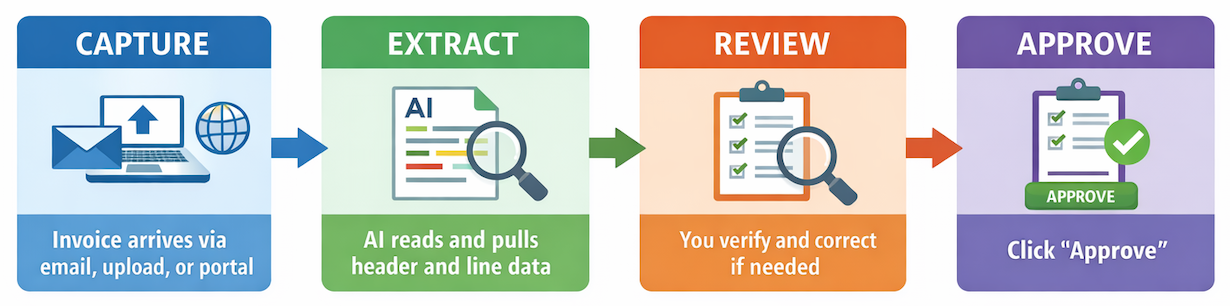
| Step | What Happens | Your Role |
|---|
| Capture | Invoice enters EZ Cloud via email, upload, or supplier portal | Minimal—invoices arrive automatically |
| Extract | AI reads the invoice and extracts header and line item data | None—this happens automatically |
| Review | You verify extracted data and make corrections if needed | Review and correct as needed |
| Approve | You approve the invoice (or route for additional approval) | Click Approve |
The result: Hours of manual data entry become minutes of review.
Getting Started
New to EZ Cloud? Start here:
- Quick Start Guide - Walk through the complete invoice lifecycle
- First Login - Set up your account and preferences
- System Requirements - Browser compatibility
Product Editions
EZ Cloud is available in two editions:
| Edition | Best For | Key Features |
|---|
| EZ Cloud Essentials | Standalone AP teams | Built-in supplier management, Supplier Portal, document storage |
| EZ Cloud Enterprise | Organizations with ERP systems | ERP integration, supplier sync, configurable workflows, advanced validation |
Throughout this documentation, guides are provided separately where the experiences differ.
Documentation
Daily Work
Invoice Processing
Setup & Configuration
Reporting
| Guide | Description |
|---|
| Dashboard | Real-time AP metrics and charts |
| Metrics | Detailed data with filtering and export |
Help
| Guide | Description |
|---|
| FAQ | Answers to frequently asked questions |
| Troubleshooting | Solutions to common issues |
| Glossary | Key terms and definitions |
Need Help?